As of July 2024, Microsoft have released an update which has added a 'Share' button at the bottom of third-party meeting apps in Teams. This new feature allows anyone in the meeting with screensharing privileges to share the contents of their app (in the side panel) with the rest of the meeting.
While some apps may benefit from this feature, Vevox does not require screen sharing within the app panel, and enabling it has the potential to create confusion for presenters and participants.
We recommend reviewing your meeting settings to ensure you are comfortable with who has permission to share screen content in your Teams meetings.
For more information on how to configure your meeting options and disable screen sharing for attendees, follow the steps below.
Side panel view for attendees when the Share button is available:
How to disable the Share button for attendees
When setting up your MS Teams meeting, click the ‘more options’ on the right:
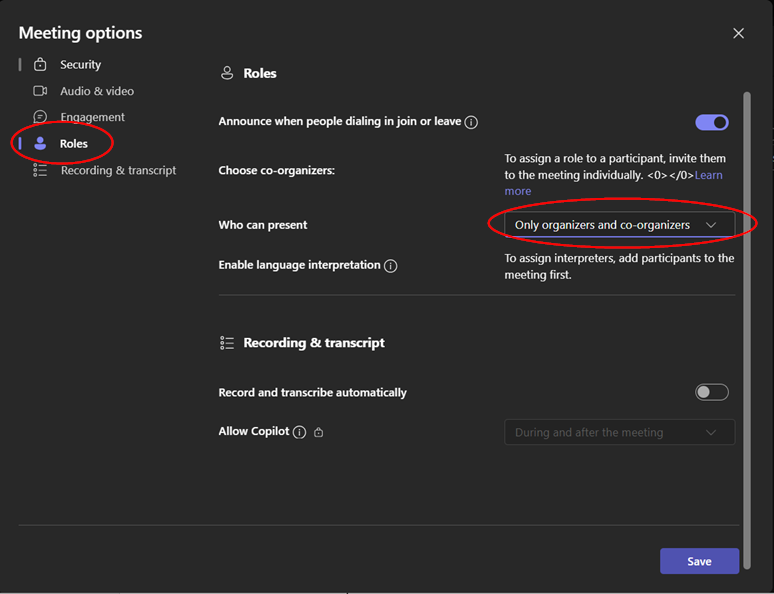
 Select Roles on the left-hand side, then change Who can present to 'Only organizers and co-organizers'. Click Save.
This will disable the Share button for attendees joining your call.
View for attendees after applying these settings — the Share button is no longer available:
Additional help and support
For more information or extra support, contact your Vevox Customer Success Manager, or support@vevox.com
* This information is correct as of 19th July 2024 and is subject to change with future Vevox & Microsoft Teams updates.